
HOW TO GUIDE: Pay bill online.
- Navigate to the Website: Open your web browser and go to TrashBilling.com.
- Log In:
- Enter your Customer ID (a 12-digit number found on your trash bill).
- Click on “Login to Your Account.”

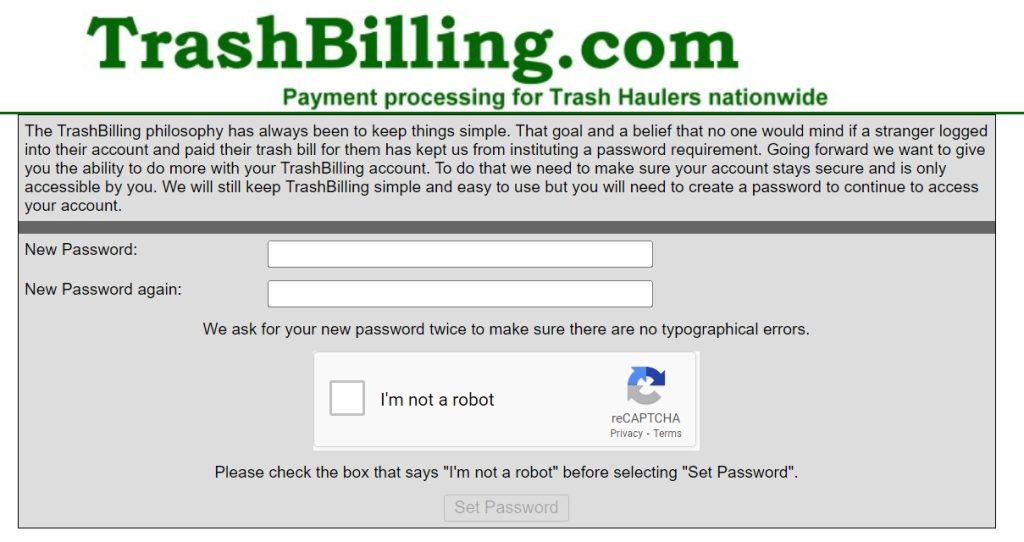
- Set/Change Password (if it’s your first time logging in):
- Create a password by entering any letters, numbers, or symbols in the “New Password” field.
- Re-enter the password in the “New Password Again” field.
- Check the box next to “I’m not a robot” and follow any additional verification steps if prompted.
- Click “Continue.”
- View Your Account: Once logged in, you will see your account details.
- Make a Payment:
- Click on “Make Payment.”
- Verify that your name, email address, and the payment date are correct.
- Enter your payment information:
- For bank account payments, provide the necessary bank details.
- For credit or debit card payments, enter your card information.
- (Optional) To enroll in automatic payments, select “Yes” in the drop-down menu beside “Sign me up for automatic payment.”
- Review Payment Information: Double-check all the entered information to ensure accuracy.
- Submit Payment: Click on “Submit Payment” at the bottom of the page.
- Confirmation: Look for a confirmation message indicating that your payment has been accepted. You will also receive an email receipt as confirmation.
If you encounter any issues while trying to pay your bill online, feel free to ask for further assistance!